B-Folders - synchronization
The synchronization technology of B-Folders
B-Folders provides an advanced and extraordinary synchronization
technology. It allows you to keep your data consistent on multiple
(more than two!) locations - desktop computers, laptops, smartphones and tablets. This way you will have all your
most valued information always with you - at work, at home or on the road.
Whatever changes you make - create, edit, move, reorder or delete - are
detected and synchronized. The technology is peer-to-peer and no Web or cloud services are used.
This consistency is achieved by performing sync sessions, each
between two peers over USB cable, wireless (Wi-Fi, 3G) or wired network. This way you can
sync your laptop with your desktop, your smartphone with your desktop,
your tablet with your smartphone, etc. You can change which works best depending upon
your location and available devices. Sync sessions are always encrypted so you can use whatever network
is available - Wi-Fi, Ethernet or even public hotspots.
B-Folders also provides a feature that allows a peer to discover
other peers on the same network - like radar. When a peer is
discovered, it can immediately participate in a sync session by
single click - no need to enter an IP address or port.
Common scenarios
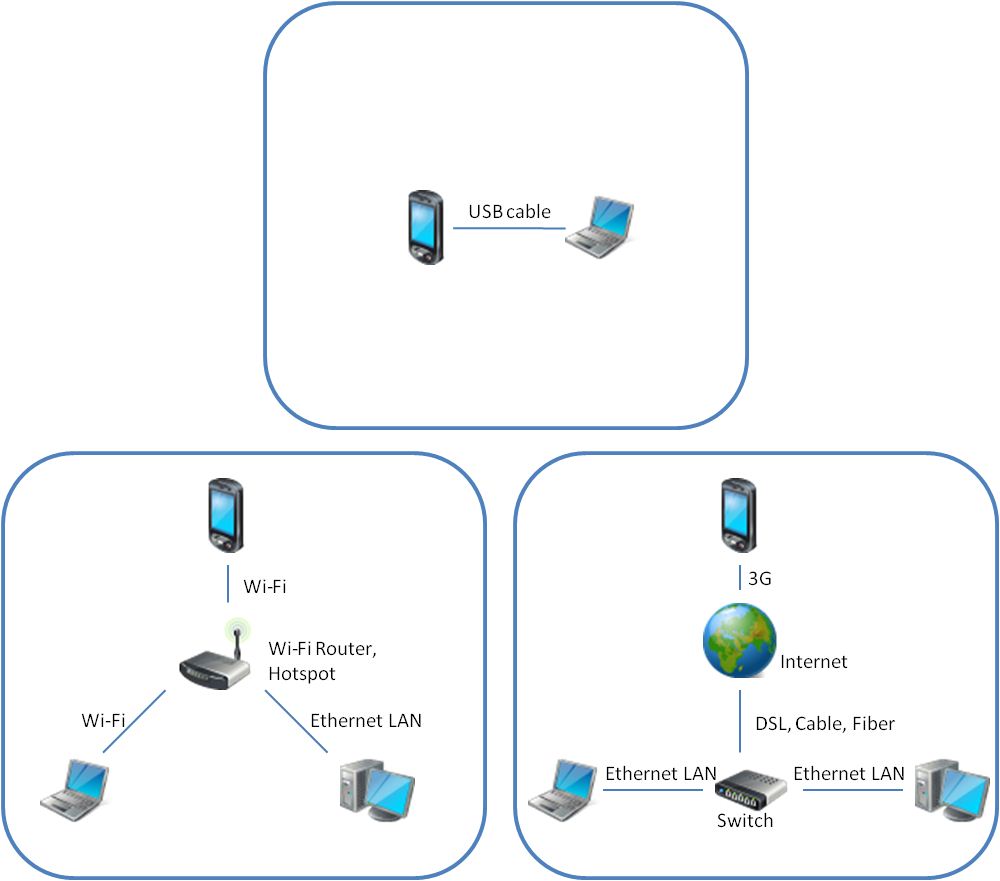
Basics
Each sync session involves two peers - one initiating the session by
sending a sync request and the other accepting and serving the sync request. If the
serving peer is busy, for example, editing an item, it will refuse the
request. The sync progress is displayed on the peer initiating the sync
session. The two peers must use the same password in order to
exchange data so there is certainty that both belong to the same person. Syncing over USB cable
Only the
database on the SD card can be synced over the USB cable. The internal
storage of Android devices is not accessible over USB, so a database
stored there can only be synced over a network - Wi-Fi or 3G. Sync
sessions over the USB cable must be initiated on the computer. TutorialAndroid device-Computer syncing over USB cable Syncing over a network
Security
- each sync session is only between the two participating peers - no
central server or internet/cloud service is used
- synchronization data being exchanged during the sync session is
transferred over a TLS
(formerly SSL) connection which provides encryption and data consistency
- the discovery feature is provided by a component separate from
the synchronization and database. This component knows and provides only
the name, IP address, port and software version information in an unencrypted
format so other peers on the same network can see it without providing
a password
Tutorials
Android device-Computer syncing over Wi-Fi
Android device-Computer syncing over 3G
Computer-Computer syncing over LAN
More info
Sync FAQ and troubleshooting
|
